M-Duino Family
The M-Duino Family PLC is a range of programmable logic controllers (PLCs) based on the Arduino Mega 2650. These PLCs are programmable using the Arduino IDE, enabling flexible development, real-time monitoring, and efficient integration into advanced industrial systems.
This faimily includes multiple configurations, ranging from 19 I/O to 58 I/O, combining analog I/O, digital isolated and non-isolated I/O, PWM, and relay outputs.
All PLC modules include built-in communication interfaces such as Ethernet, RS485, RS232, dual Serial TTL, SPI and I²C.
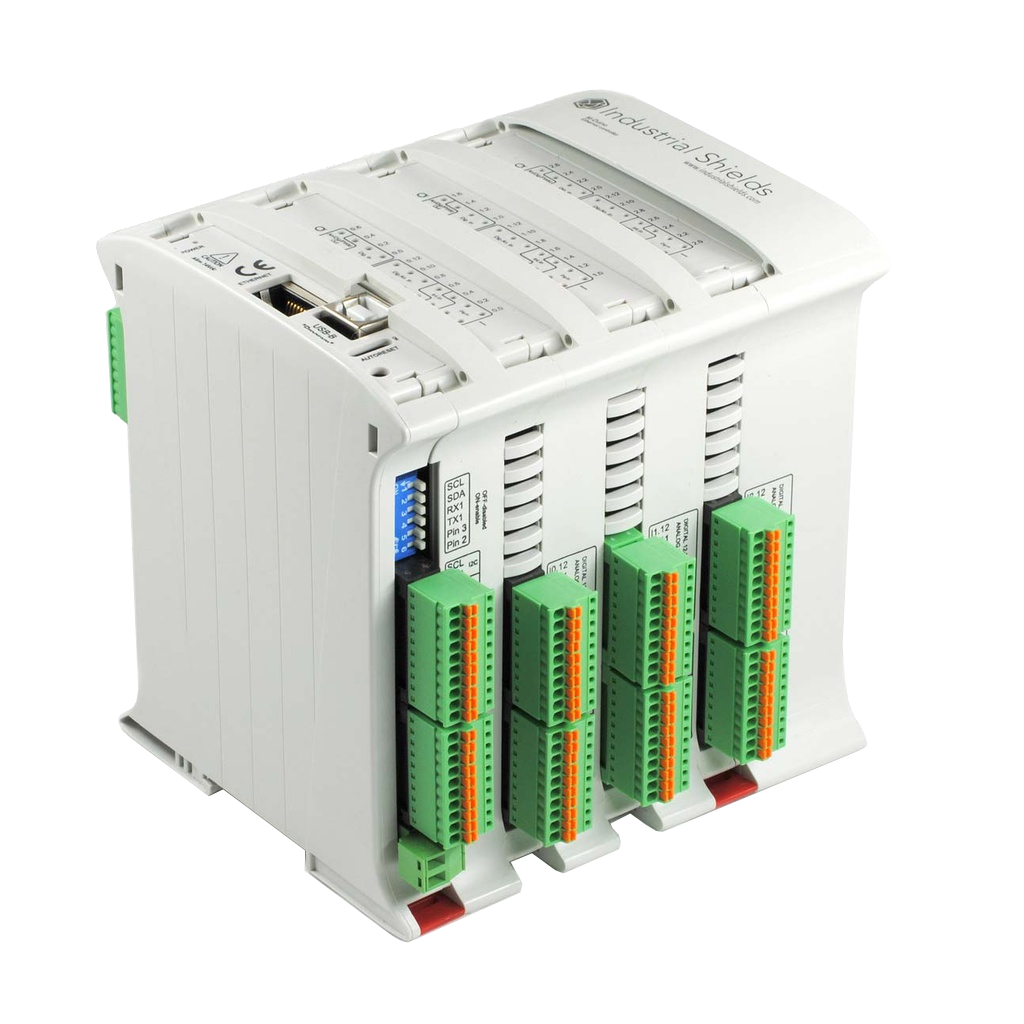
What is included on purchase (default product)
- 1x M-Duino PLC model
- 1x 3.3V cell coin battery for RTC
The pack includes all the required connectors for the specific model.
Requirements to use
- 1x M-Diuno PLC (any model)
- 1x USB-A to USB 2.0 type B cable (for programming)
- 1x DC power supply (12V-24V)
Model Overview
The family spans 19 to 58 I/O points across two form factors: standard digital/analog I/O models and mixed digital/analog/relay models. All models share the same comunication stack and expansion slot.
| Model | Reference | Total Inputs | Total Outputs | Analog Input | Digital Isolated Input (Interrupt) | Digital Insolated Output | Digital/Analog Output | Relay Output | PWM Isolated Output | Power Consumption (W) |
|---|---|---|---|---|---|---|---|---|---|---|
| 19R+ | IS.MDUINO.19R+ | 6 | 11 | 4 | 2 (2) | 0 | 3 | 8 | 3 | 4.85 |
| 21+ | IS.MDUINO.21+ | 13 | 8 | 6 | 7 (2) | 5 | 3 | 0 | 3 | 2.88 |
| 38AR+ | IS.MDUINO.38AR+ | 19 | 19 | 10 | 9 (4) | 5 | 6 | 8 | 6 | 5.30 |
| 38R+ | IS.MDUINO.38R+ | 12 | 22 | 8 | 4 (4) | 0 | 6 | 16 | 6 | 7.51 |
| 42+ | IS.MDUINO.42+ | 26 | 16 | 12 | 14 (4) | 10 | 6 | 0 | 6 | 3.07 |
| 50RRA+ | IS.MDUINO.50RRA+ | 22 | 28 | 12 | 10 (6) | 4 | 8 | 16 | 8 | 7.73 |
| 53ARR+ | IS.MDUINO.53ARR+ | 25 | 28 | 14 | 11 (6) | 5 | 8 | 15 | 8 | 7.75 |
| 54ARA+ | IS.MDUINO.54ARA+ | 29 | 25 | 14 | 15 (6) | 9 | 8 | 8 | 8 | 5.54 |
| 57AAR+ | IS.MDUINO.57AAR+ | 32 | 25 | 16 | 16 (6) | 10 | 8 | 7 | 8 | 5.30 |
| 57R+ | IS.MDUINO.57R+ | 18 | 31 | 12 | 6 (6) | 0 | 8 | 23 | 8 | 10.20 |
| 58+ | IS.MDUINO.58+ | 36 | 22 | 16 | 20 (6) | 14 | 8 | 0 | 8 | 3.02 |
Note
The analog inputs can also be used as digital non-isolated inputs.
The PWM isolated outputs can also be used as digital isolated outputs. The associated PWM and analog outputs cannot be used at the same time (check switch configuration).
The Power Consumption was measured at 24 Vdc with all outputs active and no external load. Not the absolute maximum. To see more about power consumption check consumption characteristics)
| Model | Zone B | Zone C | Zone D |
|---|---|---|---|
| 19R+ | Relay | - | - |
| 21+ | Analog/Digital | - | - |
| 38AR+ | Analog/Digital | Relay | - |
| 38R+ | Relay | Relay | - |
| 42+ | Analog/Digital | Analog/Digital | - |
| 50RRA+ | Relay | Relay | Analog/Digital |
| 53ARR+ | Analog/Digital | Relay | Relay |
| 54ARA+ | Analog/Digital | Relay | Analog/Digital |
| 57AAR+ | Analog/Digital | Analog/Digital | Relay |
| 57R+ | Relay | Relay | Relay |
| 58+ | Analog/Digital | Analog/Digital | Analog/Digital |
Pinout
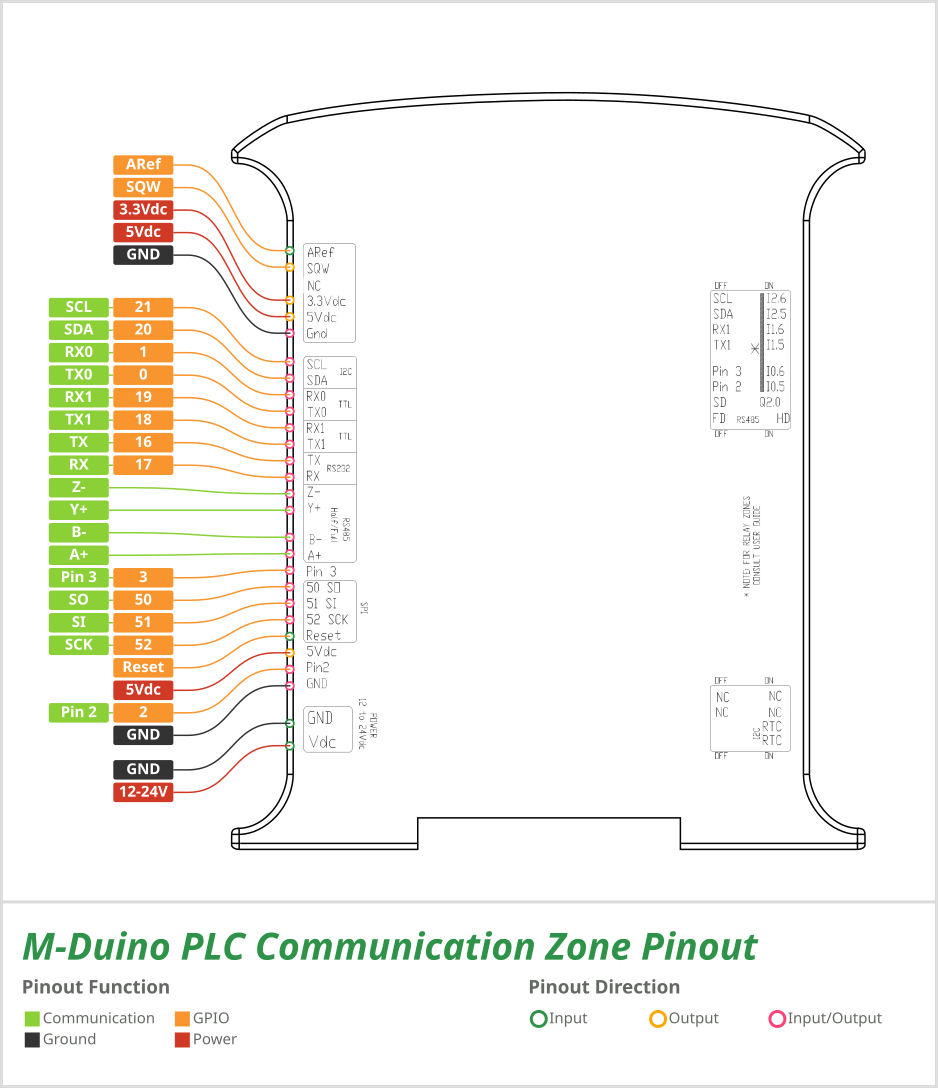
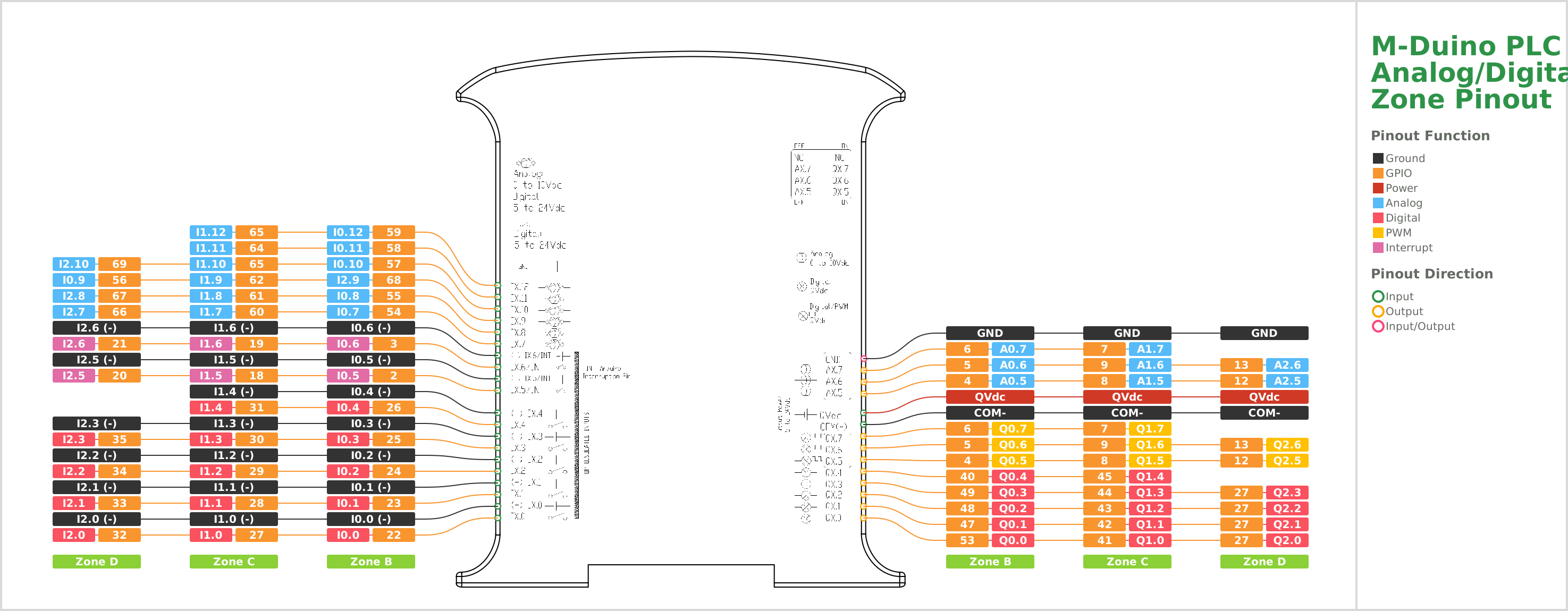
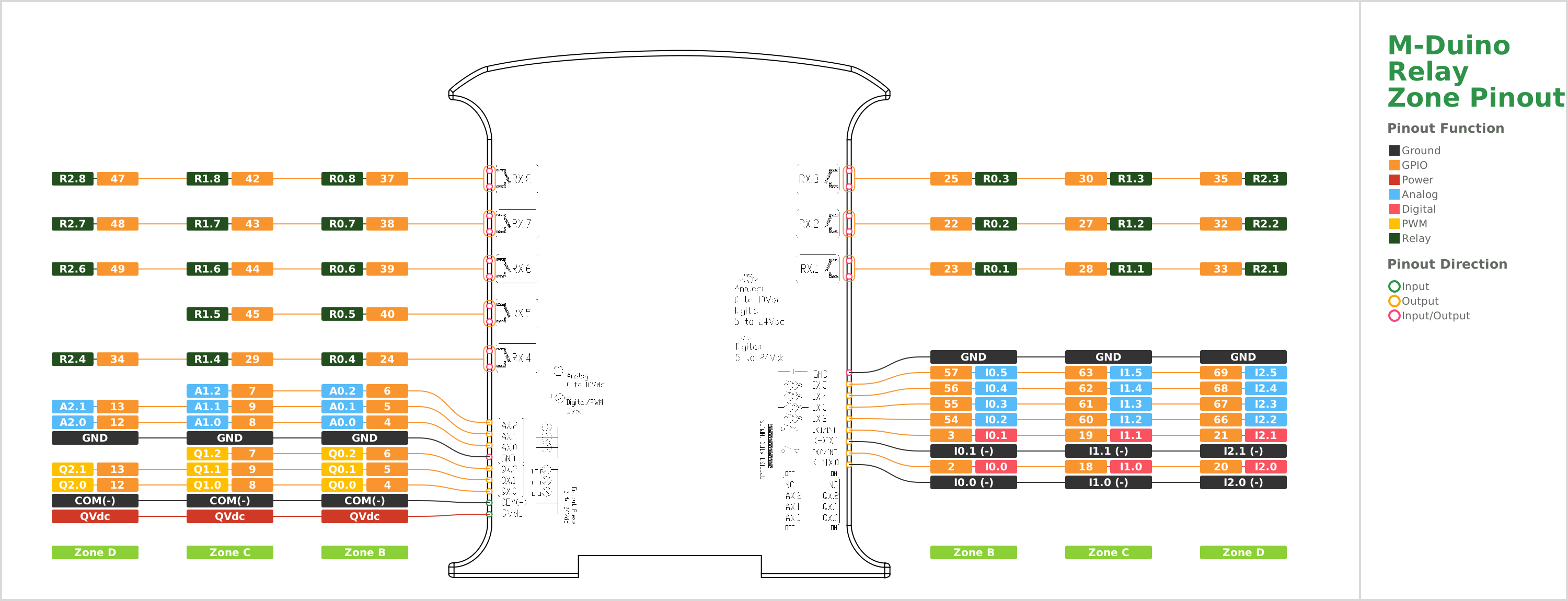
Technical Features
Processing and Memory
| Feature | Specification |
|---|---|
| Board | Arduino Mega 2560 |
| Microcontroller | ATmega2560 |
| Clock Speed | 16MHz |
| SRAM | 8 kB |
| Flash storage | 256 kB (8kB used by the bootloader) - expandable via SD up to 32GB |
| EEPROM | 4 kB |
| RTC | DS1307 Real-time clock powered with included button battery (CR1216 or CR1220) |
Connectivity
| Interface | Details |
|---|---|
| USB | 1x USB 2.0 Type-B (for programming) |
| Ethernet | 1x 110Mb/s Ethernet, RJ45 |
| RS-485 | 1x Full or Half Duplex interface (depending on the switch configuration) |
| RS-232 | 1x Full Duplex interface |
| Serial TTL | 2x TTL interfaces |
| I²C | 1x 5V I²C bus |
| SPI | 1x 5V SPI interface |
Block diagram


Usage environments
| Parameter | Value |
|---|---|
| IP protection | IP 20 |
| Insulation resistance | 20 MΩ min. at 500Vdc between the AC terminals and the protective earth terminal |
| Dielectric strength | 2.300 Vac to 50/60 Hz for one minute with a leakage current of 10 mA max. Between all the external AC terminals and the protective ground terminal |
| Shock resistance | 80 m/s² in the X, Y and Z direction 2 times each |
| Operating temperature | 0º to 60ºC |
| Permissible relative humidity | 10% to 90% (No condensation) |
| Ambient environment | Free from corrosive gases |
| Storage temperature | -20º to 60ºC |
| Power supply holding time | 2 ms min. |
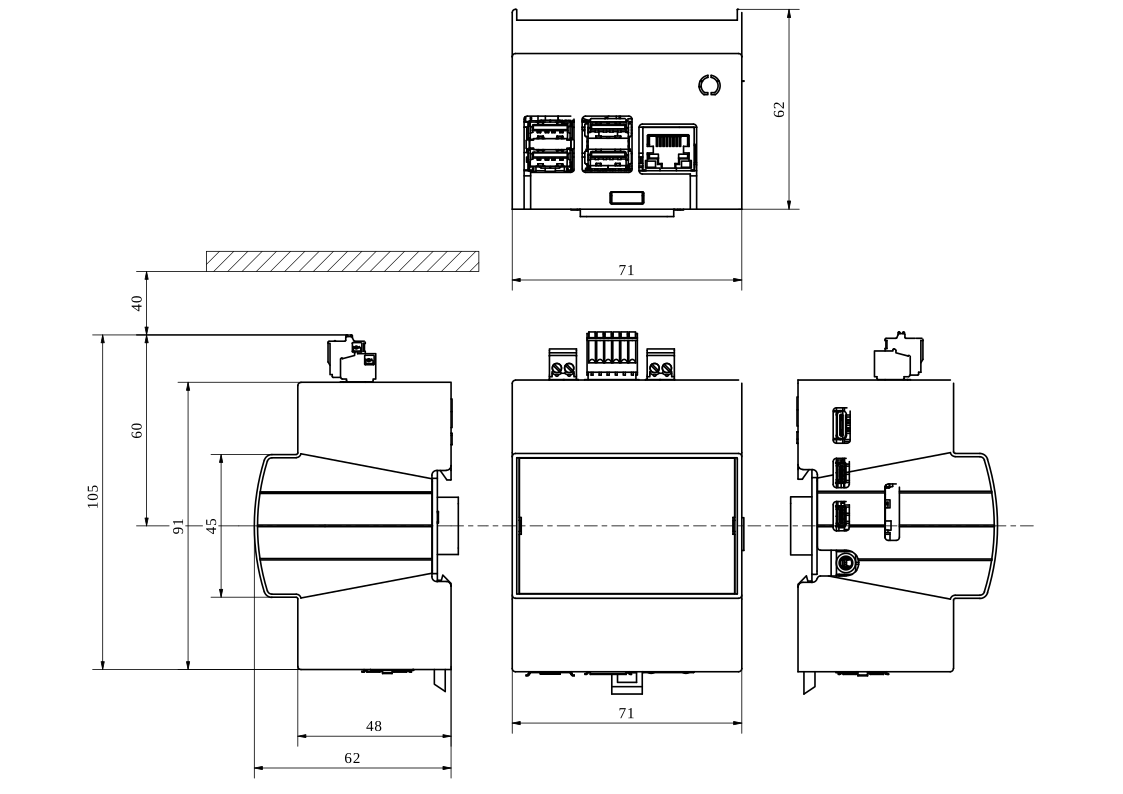
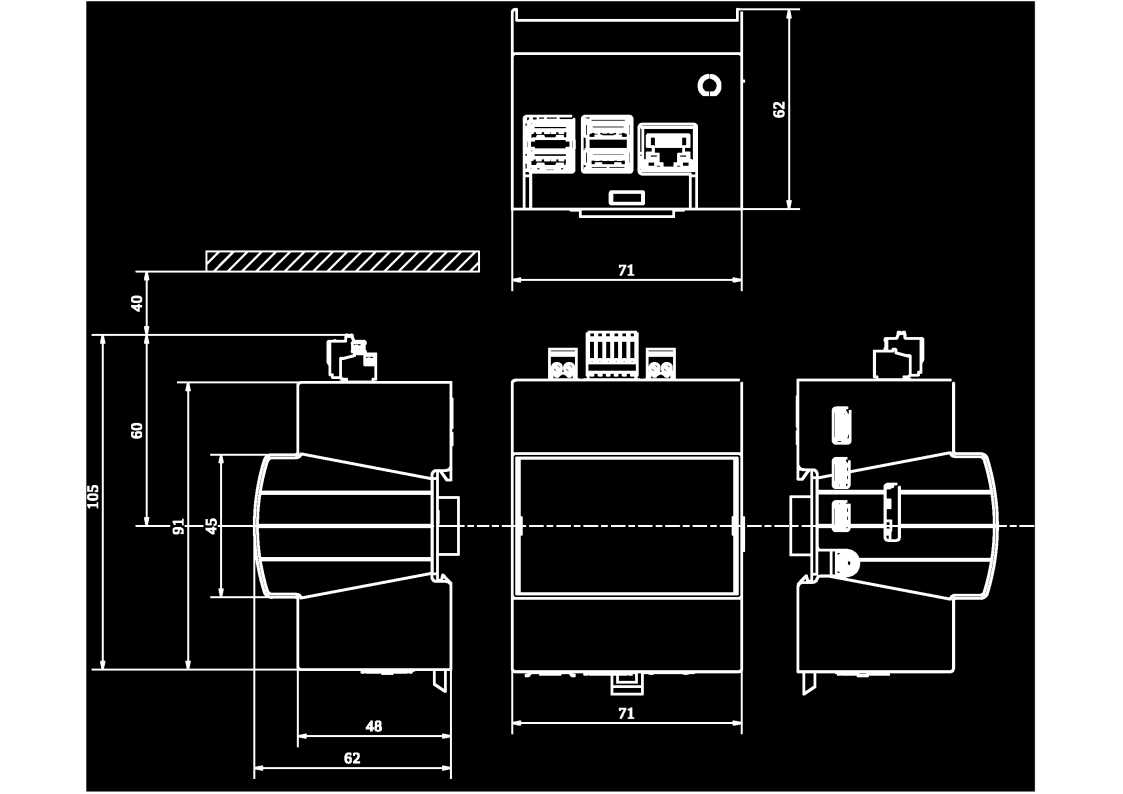
Measures
| Configuration | H × W × D (mm) | Weight (wihtout expansion board) |
|---|---|---|
| 19R+ and 21+ | 119.5 × 70.1 × 101 | 378 g |
| 38AR+, 38R+ and 42+ | 119.5 × 94.7 × 101 | 488 g |
| 50RRA+, 53ARR+, 54ARA+, 57AAR+, 57+ and 58+ | 119.5 × 119.3 × 101 | 598 g |

Power supply
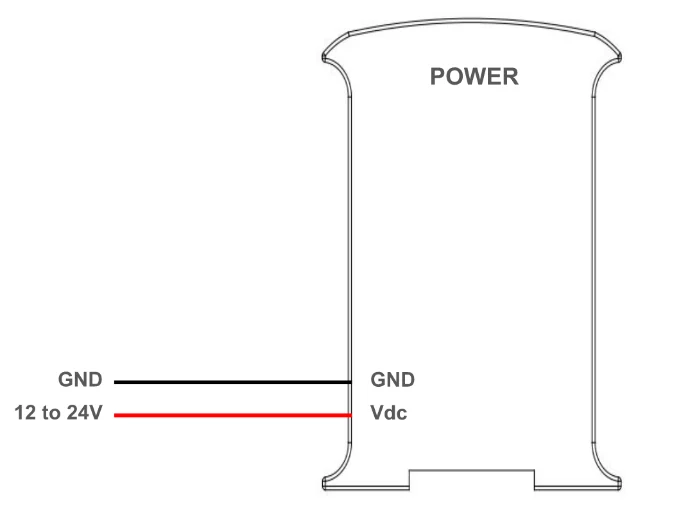
The M-Duino Family is designed to be used with an external power supply, providing a voltage between 12 and 24 Vdc.
Warning
Altough at first glance it may seem like the M-Duino works when powered with the USB port, this is not the case. The usage of an external power supply is mandatory for the M-Duino to perform properly.
The consumption of M-Duino based PLCs range between 700 and 1500mA. Therefore. Industrial Shields recommends using a power supply capable of delivering at least 1.5A.
Next, a simple diagram is shown to see how to connect a power supply to any Industrial Shields unit.
Important
The polarity is not reversible. Make sure the live and GND connector of the power supply match the M-Duino.
Power consumption
This report explores how different M-Duino models consume power during resting and high-ouput scenarios. Understanding these patterns is crucial for optimizing efficiency in industrial applications.
In this scenario, the M-Duino is powered on, with all pins and communications turned off and utilizing a 24V power supply. This test measures the baseline power consumption when the device is resting and not actively engaged in any processing or other non-basic tasks.
| Model | Current (mA) | Power (W) |
|---|---|---|
| 19R+ | 80 | 1.92 |
| 21+ | 99 | 2.376 |
| 38AR+ | 77 | 1.848 |
| 42+ | 92 | 2.208 |
| 50RRA+ | 82 | 1.968 |
| 53ARR+ | 71 | 1.704 |
| 54ARA+ | 76 | 1.824 |
| 57AAR+ | 71 | 1.704 |
| 57R+ | 73 | 1.752 |
| 58+ | 76 | 1.824 |
For this test, the M-Duino is ocnfiguret to set all ouput pins to high state utilizing a 24V power supply. However, the outputs are not connected to any load, which means that the power consumption will vary depending on the current drawn by the device connected to each output.
| Model | Current (mA) | Power (W) |
|---|---|---|
| 19R+ | 202 | 4.848 |
| 21+ | 120 | 2.88 |
| 38AR+ | 313 | 7.512 |
| 42+ | 128 | 3.072 |
| 50RRA+ | 322 | 7.728 |
| 53ARR+ | 323 | 7.752 |
| 54ARA+ | 231 | 5.544 |
| 57AAR+ | 221 | 5.304 |
| 57R+ | 425 | 10.2 |
| 58+ | 126 | 3.024 |
Note
The power consumption is measured at 24 Vdc.
The current column in the Resting mode denotes the minimum current drawn by the M-Duino when all outputs are at a LOW level representing the M-Duino's baseline power consumption.
In contrast, the current column in the All outputs HIGH mode reflects the current drawn by the M-Duino when all outputs are at a HIGH level, and there are no connections to any of the outputs. While this value is not the absolute maximum the M-Duino can draw, it serves as a reference point for expected current values.
Note
It's important to note that the practical maximum current may vary depending on the type of actuators connected to the outputs and the number of I/Os used. The actual consumption can be influenced by the specific configuration and load connected to the M-Duino's outputs.
Initial Software Installation
The M-Duino Family is programmed using Arduino IDE with the industrialshields-avr boards package. Follow these steps to prepare your development environment.
Step 1 - Download Arduino IDE
Download and install the latest version of Arduino IDE for your operating system from the official Arduino website.
Step 2 - Install the Industrial Shields boards package
- Open Arduino IDE.
- Go to File → Perferences
- In the Additional Boards Manager URLs field, add the Industrial Shields boards URL. Refer to the official installation tutorial for the current URL.
- Go to Tools → Boards Manager
- Search for
industrialshields-avr, select the latest version, and click Install.
Step 3 - Select your board and port
- Connect the PLC to your computer via USB-B.
- Connect and switch on the external DC power supply.
- In Arduino IDE, go to Tools → Boards and select your specific M-Duino model.
- Go to Tools → Port and select the COM or serial port assigned to the PLC.
Step 4 - Upload your first sketch
Open any example sketch from File → Examples → IndustrialShields and click Upload to verify your setup.
// Minimal blink example - toggle digital output Q0.0 every second

void setup() {
  pinMode(Q0_0, OUTPUT);
}

void loop() {
  digitalWrite(Q0_0, HIGH);
  delay(1000);
  digitalWrite(Q0_0, LOW);
  delay(1000);
}
Note
Pin names such as Q0_0 are defined in the Industrial Shields board packages. Do not use raw Arduino MEGA 2560 GPIO numbers - use the named constants for your model.
Hardware Configuration
DIP Switches
The M-Duino based PLCs have some switches which can be used to configure certain functionalities of the PLC. This section explains how to use them properly. To differentiate between the different parts of the PLC and locate every switch accordingly, the following nomenclature will be used:
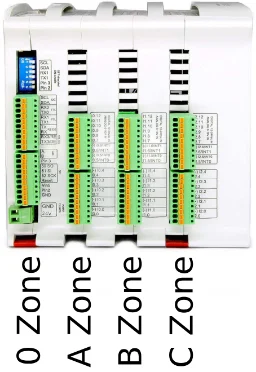
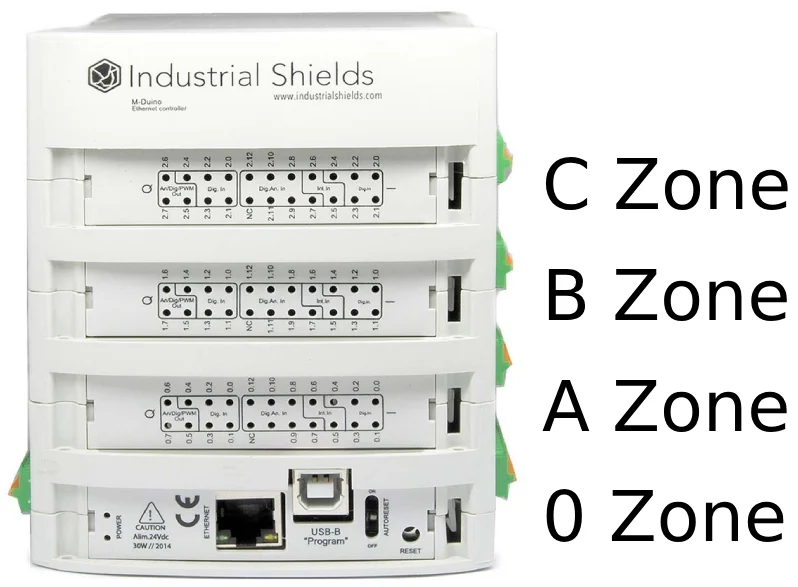
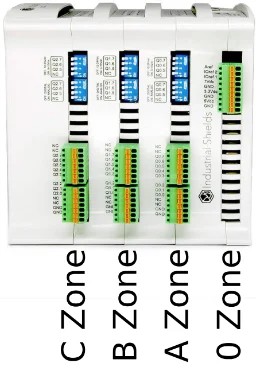
In each zone there are one or more switches, used to configure some of the PLC functionalities. The following tables indicate the purpose of each switch and how to configure them.
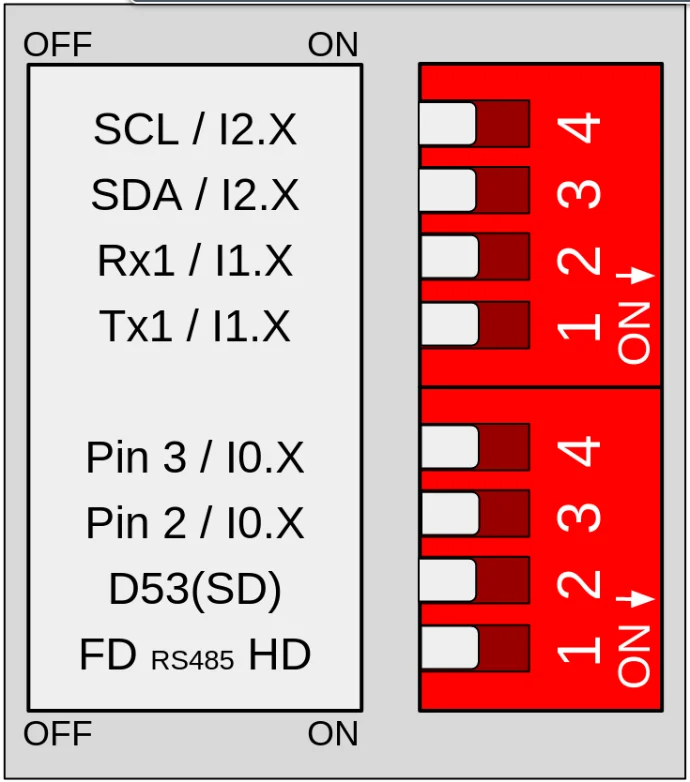
A zone: top left switch
| Switch | OFF | ON |
|---|---|---|
| 4 (top) | SCL | I2.X |
| 3 (top) | SDA | I2.X |
| 2 (top) | RX1 | I1.X |
| 1 (top) | TX1 | I1.X |
| 4 (bottom) | Pin 3 | I0.X |
| 3 (bottom) | Pin 2 | I0.X |
| 2 (bottom) | SD | X |
| 1 (bottom) | FD | HD |
Top switch:
- If this switch is ON, it enables the I1.X input and disables TX1. If this switch is OFF, it enables TX1 and disables I1.X.
- If this switch is ON, it enables the I1.X input and disables RX1. If this switch is OFF, it enables RX1 and disables I1.X.
- If this switch is ON, it enables the I2.X input and disables SDA. If this switch is OFF, it enables SDA and disables I2.X. 4 .If this switch is ON, it enables the I2.X input and disables SCL. If this switch is OFF, it enables SCL and disables I2.X.
Bottom switch:
- If this switch is ON, it enables the Half Duplex (HD) option and disables the FD. If this switch is OFF, it enables Full Duplex (FD) and disables HD.
- If this switch is OFF, it enables the Chip Select of the microSD. In some M-Duino PLC, if this switch is ON it enables a digital output.
- If this switch is ON, it enables the I0.X input and disables Pin 2. If this switch is OFF, it enables Pin 2 and disables I0.X.
- If this switch is ON, it enables the I0.X input and disables Pin 3. If this switch is OFF, it enables Pin 3 and disables I0.X.
Note
The X in, for example in I0.X, represents different pins for the different M-Duino PLC models. On the other hand, the X alone, in the Switch 3 (bottom), represents either nothing or a digital output, depending on the M-Duino model.
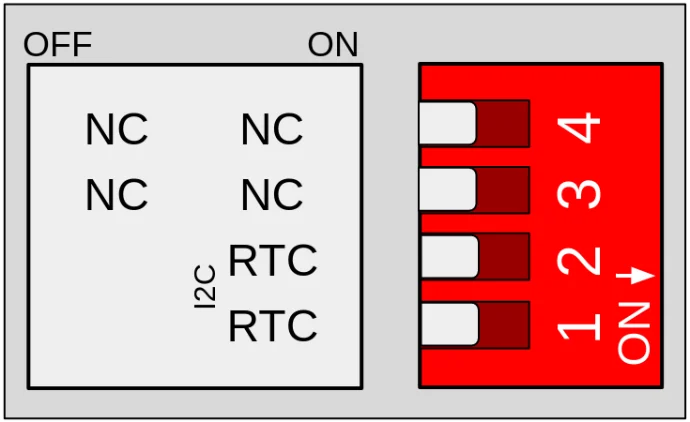
A zone: bottom left switch
| Switch | OFF | ON |
|---|---|---|
| 4 | X | X |
| 3 | X | X |
| 2 | X | RTC |
| 1 | X | RTC |
Only switches 1 and 2 are used. Both switches enable the I²C communication to communicate with the RTC. Having these switches in ON mode it activates this communication, whereas if it is in OFF mode it disables the I²C to reach the RTC.
B, C and D Zone: Analog switch
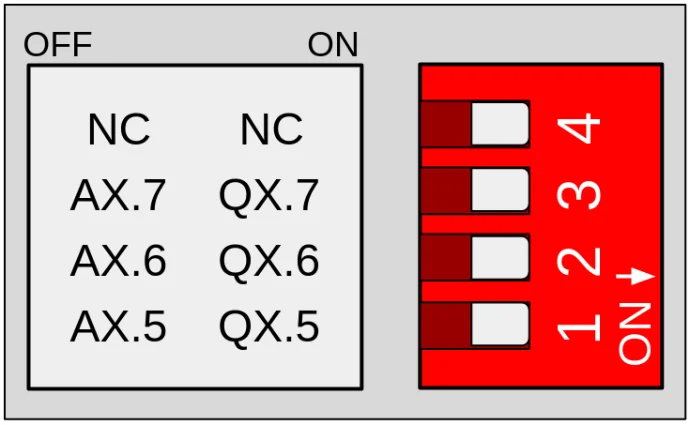
| Switch | OFF | ON |
|---|---|---|
| 4 | X | X |
| 3 | AX.7 | QX.7 |
| 2 | AX.6 | QX.6 |
| 1 | AX.5 | QX.5 |
These switches are used to choose between digital or analog output, according to the previous table. If it is set to OFF, only the corresponding analog output will be available. If it is set to ON, only the corresponding digital output will be available. The switches behave the same way in zones B, C and D, with the X value, for example in AX.5, being different depending on the zone:
- Zone B: X = 0
- Zone C: X = 1
- Zone D: X = 2
Note
The X alone, in the Switch 4, represents an no connect (NC). In Zone D, Switch 3, also represents a NC.
Troubleshooting
| Symptons | Likely cause | Resolution |
|---|---|---|
| PLC does not boot when USB is connected | No external power supply connected | Connect and switch on a 12-24 V DC supply before use |
| Upload fails in Arduino IDE | Wrong board or port selected | Verify board selection and COM/serial port in the Tools menu |
| Upload fials in Arduino IDE | External power supply not connected | The USB port alone is insufficient - connect DC supply first |
| Analog output not responding | DIP switch set to digital output mode | Set the relevant Zone B/C/D switch to OFF for that channel |
| RTC loses timer after power cycle | Coin-cell battery missing or depleted | Insert or replace the CR1216/CR1220 battery |
| Device overheating or unstable behaviour | Insufficient clearance inside cabinet | Ensure at least 25 cm of free space around the unit |