M-Duino Family - I/Os
Inputs
Analog
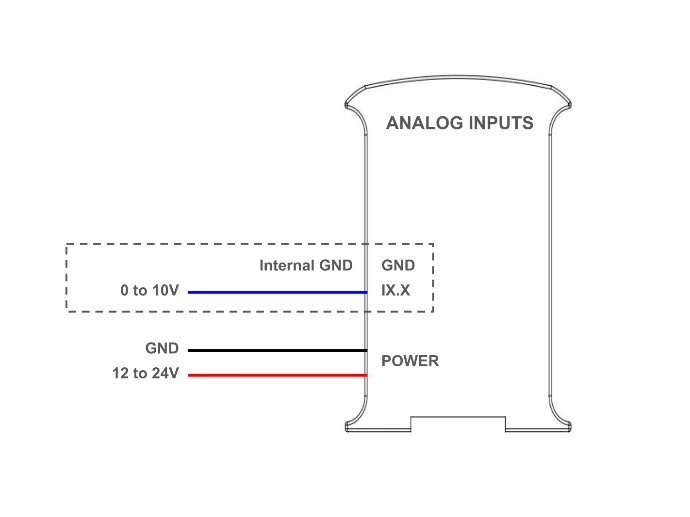
Analog input provides a way to read analog voltage levels, coding the value with an N-bit number. The analog inputs on the M-Duino based PLC use the internal GND for reference (the same as the power supply). The analog inputs on these PLCs have the following specifications:
- Voltatge range: from 0 to 10 Vdc.
- Resolution: 10 bits, which means the read values can range between 0 and 1023.
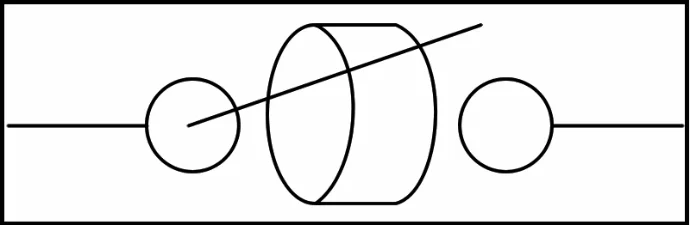
Additionally, the analog inputs can also be used as non-isolated digital inputs tolerating up to 24 Vdc. To do so, refer to the digital inputs section. The analog inputs are the ones between IX.7 and IX.12 with X being 0, 1 or 2 depending on the zone. You can identify the analog inputs on your device with the following symbol:
The next diagram illustrates the necessary connections to properly use an analog input (when used as a digital, the input can tolerate up to 24V):
Software setup
In order to use them, the analog inputs must be configured in the set up part of the code, like it is usually done in common Arduino boards. Then they can be read using the analogRead() function, with the input name as it's parameter. For example, I0.7 is read as I0_7:
void setup() {
  pinMode(I0_7, INPUT);
  Serial.begin(9600);
}

void loop() {
  Serial.println(analogRead(I0_7));
}
Pinout time response
| Input type | Sampling Frequency - Average | Sampling frequency - Highest read time |
|---|---|---|
| Analog (IX.7-IX.12) | 8.858 kHz (112.89µs) | 4.9 kHz (204µs) |
Digital
Digital inputs are used to capture signals that exist in one of two states: high or low, true or false, etc. The M-Duino PLC has 2 types of inputs which can be used as digital input:
-
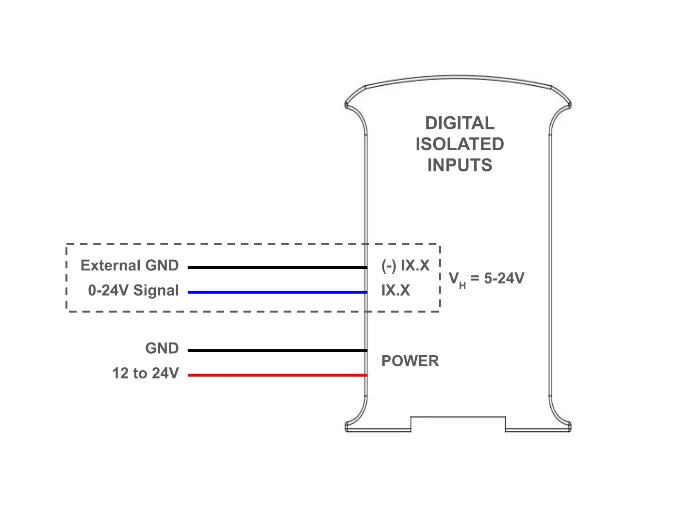
Digital isolated inputs: these inputs are opto-isolated, which means they have an extra protection and they use an external ground pin for reference. They are the pins from IX.0 to IX.6, where X is 0, 1 or 2 depending on the zone.
-
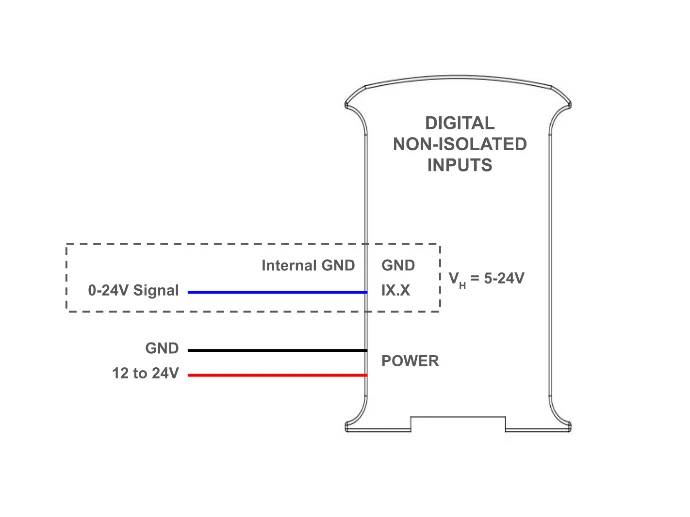
Digital non-isolated inputs: these inputs are not opto-isolated, and they use the internal GND of the PLC as reference. They are the same as the analog inputs, going from IX.7 to IX.12, with X being 0, 1 or 2 depending on the zone.
Note
Depending on the model the pins may vary always check the symbols on your PLC to know which type of input it is. For more information on the models, see Model Overview.
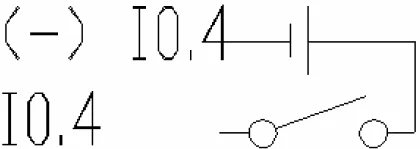
You can identify them with the following symbols:

The next diagram illustrate the necessari connections to properly use both inputs as digital:
Software setup
In order to use them, the digital inputs must be configured in the set up part of the code, like it is done in common Arduino boards. Then they can be read using the digitalRead() function, with the input name as its parameter. For example, I0.0 is read as I0_0:
void setup() {
  pinMode(I0_0, INPUT);
  Serial.begin(9600);
}

void loop() {
  Serial.println(digitalRead(I0_0));
}
Pinout time response
| Input type | Sampling Frequency - Average | Sampling frequency - Highest read time |
|---|---|---|
| Digital Opto-isolated (IX.0 - IX.4) | 176.99 kHz (5.65µs) | 83.3 kHz (12µs) |
| Digital Non Opto-isolated (IX.7-IX.12) | 176.99 kHz (5.65µs) | 83.3 kHz (12µs) |
Pinout voltage threshold
| Input type | LOW to HIGH |
|---|---|
| Digital Isolated (IX.0 - IX.4) | 4.2V |
| Digital Non-isolated (IX.7-IX.12) | 5.2V |
Note
Depending on the model and pin the exact value may vary.
Interrupt
Some of the digital inputs in the M-Duino PLC are interrupt capable, which means they can be used with ISRs (interrupt service routine) to trigger certain code execution when an event (a change of state in the pin) is detected. There are two pins of this type on each zone: IX.5 and IX.6. They are used and connected as regular digital isolated inputs, and the interrupts are programmed through software.
Hardware setup
The interrupt inputs need to be activated using the A zone top switches:
- I0.5 and I0.6 also work as Pin2 and Pin3. Enable Interrupts turning ON the switches number 3 and 4 of down communication swithces.
- I1.5 and I1.6 also work as TX1 and RX1. Enable Interrupts turning ON the switches number 1 and 2 of up communication switches.
- I2.5 and I2.6 also work as SDA and SCL. Enable Interrupts turning ON the switches number 3 and 4 of up communication switches.
Check the Hardware Configuration section for more information.
Software setup
This is an example of how to use the interrupt pins. In this case, the function isrI0_5() is automatically called every time a change of state occurs on the I0_5 pin.
void setup() {
  // Begin serial port
  Serial.begin(9600);
  // Set input
  pinMode(I0_5, INPUT);
  // Initialize interrupt
  attachInterrupt(digitalPinToInterrupt(I0_5), isrI0_5, CHANGE);
}

void loop() {
  while(true);
}

void isrI0_5() {
  Serial.println("Interrupt activated");
}
Pinout time response
| Input type | Sampling Frequency - Average | Sampling frequency - Highest read time |
|---|---|---|
| Digital Interrupt | 121.51 kHz (8.23µs) | 62.5 kHz (16µs) |
Pinout voltage threshold
| Model Type | LOW to HIGH |
|---|---|
| Analog | 4.1V |
| Relay | 6.8V |
Note
Depending on the model and pin the exact value may vary.
Outputs
Analog
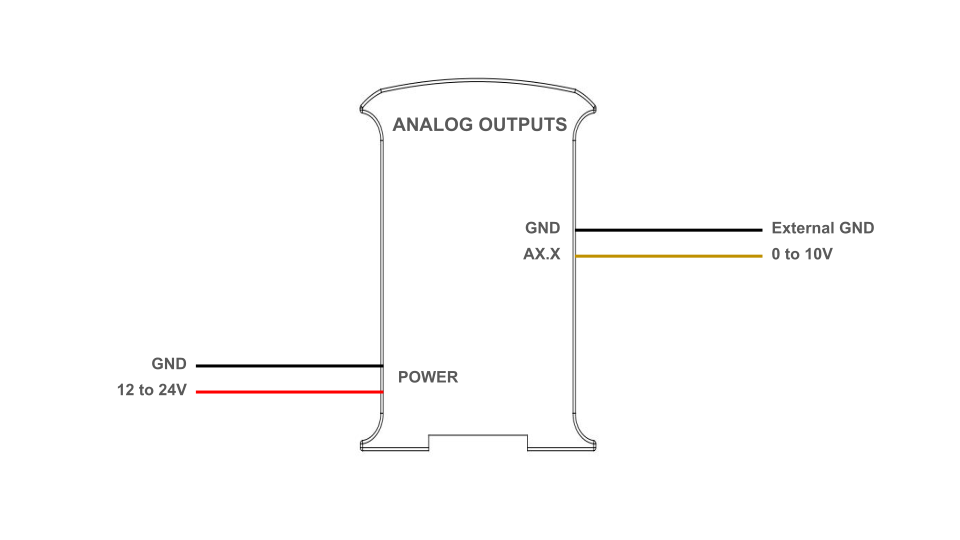
An analog output provides a voltage determined by a digital value with an N-bit number. The M-Duino PLCs can have between 3 and 8 analog outputs, depending on the model. These are labeled as AX.X, and need to be selected via DIP switch to be used (check the Hardware Configuration secont for more information). The analog outputs in the M-Duino PLC have the following specifications:
- Voltage range: from 0 to 10 V.
- Resolution: 8 bits.
The analog outputs have a shared external GND pin, which needs to be connected to set the reference. This symbol identifies the analog outputs, and the following diagram illustrates how to connect them:

Software setup
The analog outputs must be configured in the set up part of the code, like it is usually done in common Arduino boards. Then they can be written using the analogWrite() function, with the output name and the desired value as its parameters. For example, A0.5 is used as A0_5:
void setup () {
  pinMode(A0_5, OUTPUT);
}

void loop() {
  analogWrite(A0_5, 0);
  delay(1000);
  analogWrite(A0_5, 200);
  delay(1000);
}
Pinout time response
| Output type | Maximum stable frequency | Sampling frequency - Maximum | Rise time | Fall time |
|---|---|---|---|---|
| Analog (AX.5-AX.7) | 2 Hz (50%) | 2.84 Hz (37.31%) | 150ms | 252ms |
Digital
The M-Duino PLC digital outputs can provide a low (0 Vdc) or high (up to 24 Vdc) value. These outputs are labeled as QX.X, and can be identified with the next symbol.
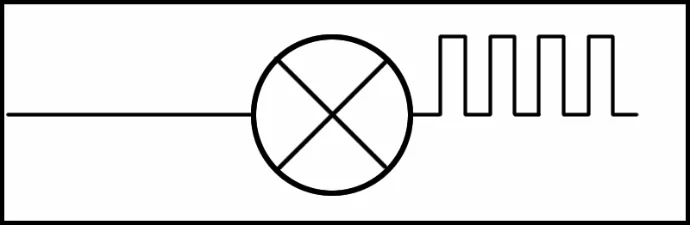
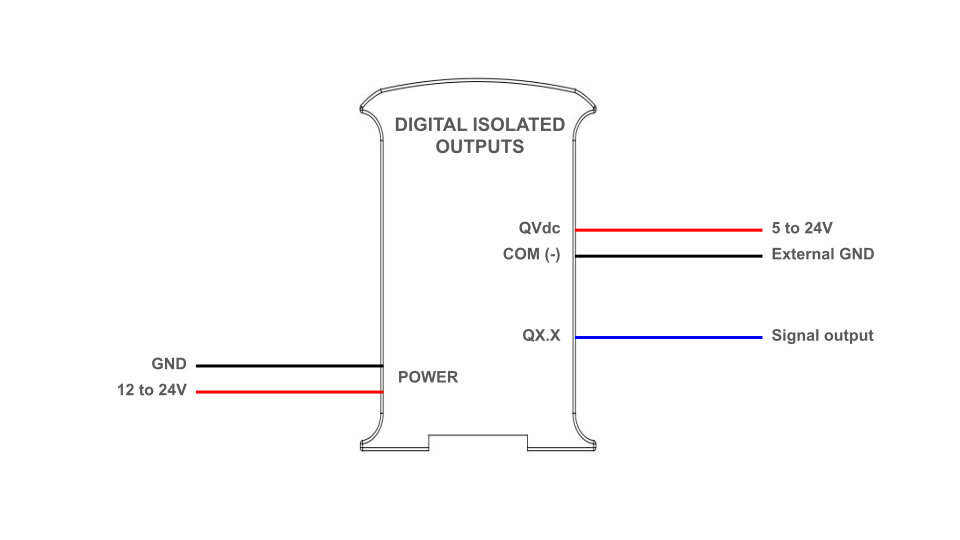
The output high value can range between 5 and 24 Vdc. This voltatge needs to be set using two pins located next to the ouputs: QVdc and COM(-). For instance, should you wanna set the output to 24V, the QVdc pin should be connected to 24V and the COM(-) pin to GND. The following diagram illustrates an example connection:
Software setup
The digital outputs must be configured in the set up part of the code, like it is usually done in common Arduino boards. Then they can be written using the digitalWrite() function, with the output name and the desired value as its parameters. For example, Q0.0 is used as Q0_0:
void setup () {
  pinMode(Q0_0, OUTPUT);
}

void loop() {
  digitalWrite(Q0_0, HIGH);
  delay(1000);
  digitalWrite(Q0_0, LOW);
  delay(1000);
}
| Output type | Maximum stable frequency | Sampling frequency - Maximum | Rise time | Fall time |
|---|---|---|---|---|
| Digital (QX.0-QX.7) | 1.953 kHz (55.86%) | 6.489 kHz (72.6%) | 476ns | 42.8µs |
PWM
In the M-Duino based PLCs, all the digital outputs can be used as PWM ouputs.
The output high value can range between 5 and 24 Vdc. As when using them as simple digital outputs, this voltatge needs to be set using two pins located next to the outputs: QVdc and COM(-). For instance, should you wanna set the output to 24V, the QVdc pin should be connected to 24V and the COM(-) pin to GND. The following diagram illustrates an example connection.
An example tutorial about how to program the PLC to use the PWM outputs can be found in our repository using the avr-Pulses library.
Relay
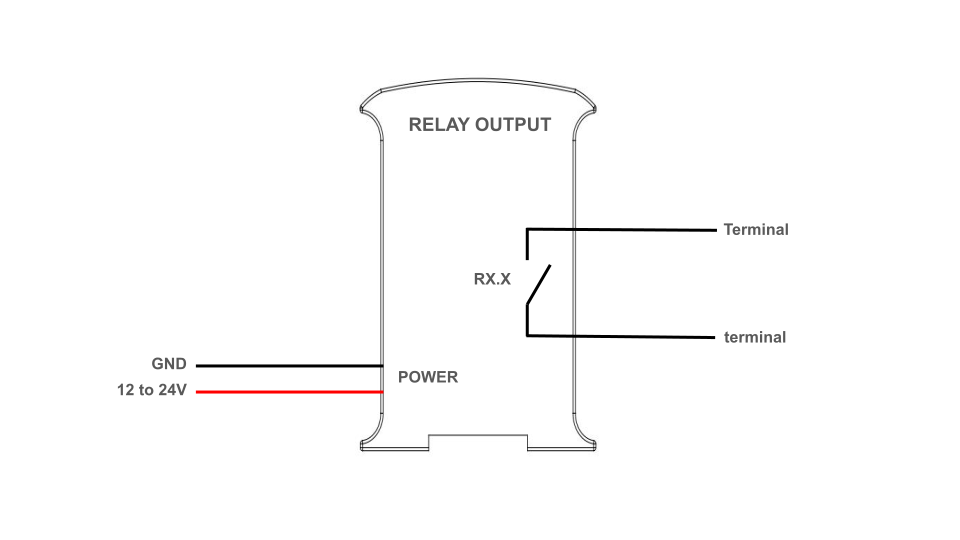
A relay is an electromagnetic switch controlled by an electric signal. In Industrial Shields units these devices are already integreted in their boards. The relays included in the M-Duino PLC can work up to 24 Vdc or 220 Vac. Each relay output has two terminals, and is labelled as RX.X. The following diagram illustrates the connections:
Software setup
The relay output must be configured in the set up part of the code, like it is usually done in common Arduino boards, and they are controlled as if they were digital outputs. The outputs can be referenced by the name showns in the serigraphy: R0.1 for instance is used as R0_1. Check the following example. When the output is set to HIGH, the relay is turned on, meaning the switch closes, whereas when it is set to LOW the switch is open.