Hardware Setup
This section provides the necessary information to correctly assemble and connect the hardware components of the system.
Before proceeding, verify that all components listed in the package are available and undamaged. Follow the instructions carefully to prevent incorrect connections or hardware damage.
Power Supply
- Supply voltage: 12Vdc or 24Vdc.
- Maximum power consumption: model dependant, check model the datasheet or specific documentation page.
Warning
The 12-24Vdc power supply is mandatory on all the devices. The USB on the Industrial Shields devices is for programming only, it cannot properly power them.
Danger
Applying a voltage higher than the device’s rated limit may cause permanent damage. Ensure the supply voltage remains within the specified range for the model in use.
Programming Connector
Arduino and ESP32-based Devices
The Arduino and ESP32 are programmed via USB. The specific connector type varies depending on the PLC model:
| PLC family | Connector type | Additional notes |
|---|---|---|
| Ardbox | USB Micro-B | |
| M-Duino | USB Type-B | |
| ESP32 | USB Micro-B | |
| ESP32 14 | USB Micro-B | Cable provided with the PLC. A long USB connector, with at least 8mm from the plastic tip to the plastic enclosure must be used for good contact. |
| Wis MKR | USB Micro-B | |
| Wis ESP32 | USB Micro-B | |
| Controllino MINI, MAXI, MEGA | USB Micro-B | |
| Controllino MICRO | USB Type-C |
PLC programming
Refer to the software setup (Arduino/ESP32) section for a guide on how to program the PLCs.
Raspberry Pi-based Devices
Raspberry Pi-based devices use Raspberry Pi OS (a Debian-based GNU/Linux distribution). Industrial Shields devices come with the OS preinstalled and ready to be accessed. They can be accessed and programmed in two different ways:
| Access type | Connector type | Additional notes |
|---|---|---|
| SSH (recommended) | Ethernet (RJ45) | |
| Direct access: screen and keyboard | Micro HDMI and USB | TouchBerry devices with an integrated screen do not need an external screen. |
PLC programming
Refer to the software setup (Raspberry Pi) section for a guide on how to access and program the PLCs.
Terminal Connectors
The following tables show the characteristics of the terminal connectors used in each device:
| Terminal | Allowed wire gauge (AWG) | Strip length (mm) | Connection method | Additional notes |
|---|---|---|---|---|
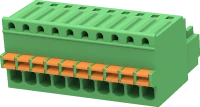 |
20-26 | 8 | Push-in | Used in several pin number variants. |
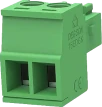 |
16-28 | 7 | Screw |
| Terminal | Allowed wire gauge (AWG) | Strip length (mm) | Connection method |
|---|---|---|---|
|
16-28 | 7 | Screw |
| Terminal | Allowed wire gauge (AWG) | Strip length (mm) | Connection method |
|---|---|---|---|
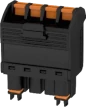 |
14-26 | 10 | Push-in |
| Terminal | Allowed wire gauge (AWG) | Strip length (mm) | Connection method |
|---|---|---|---|
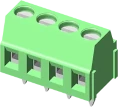 |
16-28 | 5 | Screw |
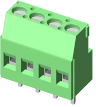 |
12-26 | 7 | Screw |
Antenna Connectors
Industrial Shields devices can be equipped with several wireless communication technologies (Wi-Fi/BT, GSM/GPRS, 4G, LoRa, GPS).
In these cases, the devices have a female SMA connector for the antenna. For devices supporting more than one communication type, such as Wi-Fi/BT and 4G, there will be a connector for each one.
Warning
As an exception, Raspberry Pi-based devices have an internal integrated antenna for the Wi-Fi/Bluetooth communication. Installation in a metallic cabinet may result in communication issues or even loss of functionality.
Cabinet Installation
All Industrial Shields devices, except the TouchBerry range, are equipped with a DIN rail mount.
- DIN Mount type: top hat rail IEC/EN 60715 – 35 × 7.5
Info
For more information about each device dimensions, check their datasheet or specific documentation page.
Warning
Before installing the device, review the installation guidelines for important safety precautions.